|

|
This is an email to let you know that registration for ALL classes is now open on our website.
|
IMPORTANT: If you have a PayPal account you don't use that is attached to your email, you may run into trouble when you go to check out. To avoid that, follow these steps.
|
- Fill out the forms and add each class to your cart for every class you're registering for.
- Click "Proceed to Checkout" on the Cart page when you're ready.
- Select the white "Pay With Debit or Credit Card" button
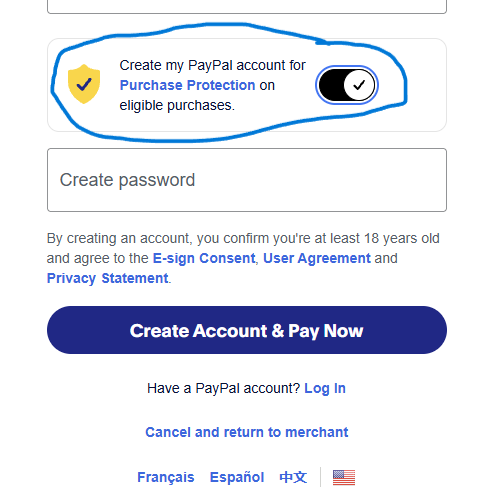
- UNSELECT the "Create my PayPal Account for Purchase Protection" button
- Proceed to Pay As Guest.
|
More detailed instructions with screenshots appear below the button!
|
|
|
|
|
|
|
|
|
|
|
|
Instructions for a known issue with PayPal
|
|
After you've selected "Proceed to Checkout", click the white "Pay With Debt/Credit" button.
|
|

|
|
On the next screen, PayPal will have automatically opted you into creating an account. You must unselect that option in order to check out successfully.
|
|
|
|
When you unselect that button, the "Create password" text field will disappear, and you should be able to click the button to finally pay as a guest.
|
|

|
We apologize for the issue. We unfortunately cannot control updates to PayPal's checkout feature. We will investigate alternative solutions in the future.
|
If you have problems with this process, or with any other process related to registration, please don't hesitate to reply to this email or get in touch in some other way so that we can help you get registered for classes.
|
|
|
|
|